
Reflection on Webinar: Technology and Feedback Strategies for Differentiated Teaching
Attended on: Sunday Aug 03
By: Andreas Molander
One of the interesting webinars I got to view later as a recording was about using simple technology tools to provide feedback to students based on their individual needs. The webinar was presented by Andreas Molander. I found it very relevant because as a teacher it is important that we assess learners based on their individual learning styles and needs. It takes you through how use of ICT could reduce the number of hours teachers spent on marking, intensify learning process and providing feedback accordingly.
Presenter began by sharing that teaching is the most rewarding job in the world. He shared the agenda for the webinar, focus would be on formative feedback strategies using digital tools that enable differentiated feedback. He shared a survey conducted in UK about the hours worked per week which is 60 hours, time spent marking papers is almost 10 hours so there is no time for individual feedback. He talked about how he checked and marked papers, and how it has resulted in error codes and did not have any affect on learning, did not help in progression etc. He shared what formative evaluation is all about,”it is the information that is communicated to the learner that is intended to modify his thinking or behaviour for the purpose of improving learning (Shute 2008, pg 154). He explained two different schools of thought about language learning that is natavist (language is an innate faculty and students need to allowed to read, speak and listen and eventually they will end up learning the language) and behaviourist(language should be trained through reinforcement thus correct usage should receive positive feedback whereas incorrect use should receive negative feedback).
The presenter shared the LangCorr approach which says that feedback should be positive and constructive and should be given with regard to students partaking in the exchange). He further says that feedback should be taken as a springboard for students to proactively improve their learning. Each student must be given feedback which is focused, elaborate and precise, students should use it to correct and rewrite their texts. He emphasizes that teachers need to understand the fact that students learn in different ways, therefore multiple approaches should be used. This actually links to Harward Gardner's Multiple Intelligence Theory proposed in 1983, in which he has identified seven distinct intelligences which suggests that students have different kinds of minds so the learn, understand, remember and perform in different ways.
He also shared the four feedback strategies that are problem identifying, instructive, inquisitive and qualifying.
He introduced the language corrector tool which helps keep track of learners errors and helps monitor learners progress. But teachers have the facility to add, remove or delete predefined comments.I just got a chance to skim through the website, the tool looks interesting and can surely engage students and provide positive feedback. I need to further try this out, could be used by our teachers in our schools.
 I downloaded the tool , free version was easy just took five to ten minutes, easy to follow instructions, I tried the toolbar in MS Word, looks helpful, could be very useful for teachers and students.
It lets you add, remove or delete comments. Some categories are already well defined and users could use comments from the given bank too. users could use the dictionary to find the meaning of the word or select the word and search meaning online.
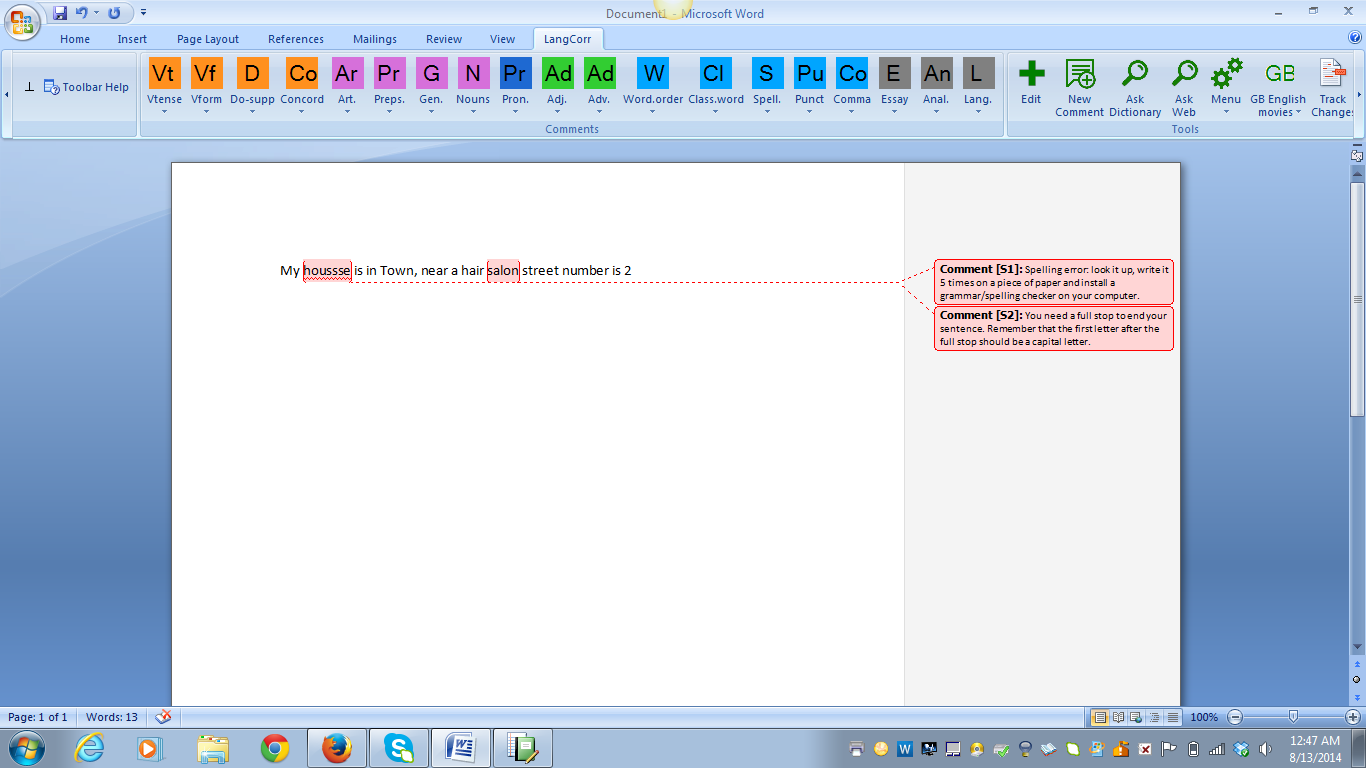 We have an ELD department which actually conducts various tests to assess teachers language proficiency before their final selection or hiring is done. i feel this tool could be very useful for them, they could use the screening tests in LangCorr, check and comment tests using the LangCorr, give relevant and meaningful positive feedback etc. Second this could be used by students independently too, there are story writing, character sketch templates given, there are math tools available, a number of other tools that they can use, which i need to explore further. I did try one of the grade 4 English tests, what was interesting was the way questions were phrased, and different tasks were structured from simple to complex. I don't see any challenges in implementing the tool in our schools or the ELD department, needs to be thoroughly explored to analyse the benefits it can offer us.
Question: I would like to research further and see the use of tool for young learners, also how could teachers use it for different subjects like maths, geog etc.
D:\Desktop\Moodle\Differentiating_Feedback.swf
Comments
Post a Comment